

 5 min read
 Last updated: 18 Jun 2026
Proactive testing matters.
Without it, you quickly end up with sporadic issues piling up, hard-to-pin-down root causes, and debugging nightmares 🫣
In other words, proactive testing is crucial for any software tool. And yes, even test automation tools need to be tested. Tools like AIVA.
And for the crew behind AIVA, we know that manual testing won’t get us far. But automating tests for a testing tool? That’s like debugging your own sense of humor.
The Testing Recursion
Let’s be serious for a while.
When you are a QA Engineer in a team developing an innovative software test automation tool, when it comes to choosing your software test automation tool, your work here is simple. You choose the software test automation tool you’re building.
… but this decision can get you into pretty mind-challenging situations.
Imagine a system like AIVA, designed to test software systems, testing itself. During each test run, AIVA plays two roles at the same time:
- The test designer/executor
- The System Under Test (SUT)
With every test step, you must keep in mind which of the two is being tested. To better understand this, let’s do a test of AIVA with AIVA.
Testing AIVA Using AIVA
Testing AIVA using AIVA is, by design, a quick and simple task. Just open the web application and click "Create new test."
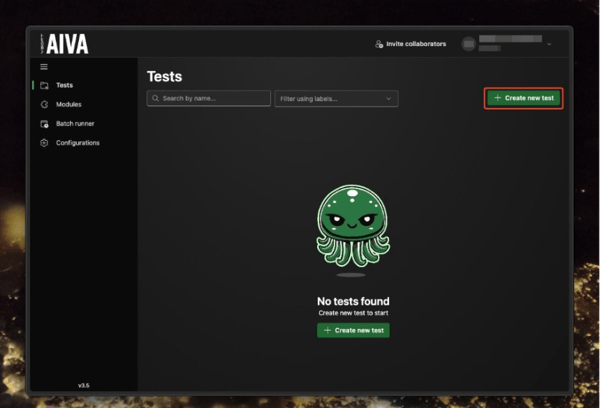
Then, enter the URL of the web application you want to automate. For this example, we’re filling in the URL of AIVA itself.

From here, interact with the app as you normally would when testing manually—AIVA takes notes of your actions, translating them into easy-to-read steps and other data necessary to locate the elements and recognize the screens. This process is called “test recording”.
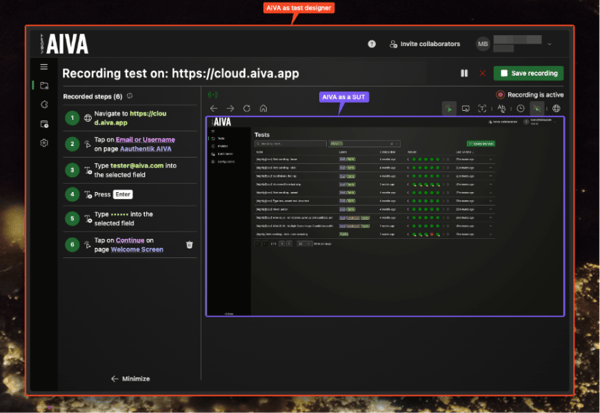
Let’s automate a scenario in which we verify that AIVA can record an assertive action.
In the SUT AIVA, click “Create new test”. At this point, we have a test recording running inside a test recording. We must be careful to make sure we use tools at the correct level. Since we want to test the assert function, we must use the assert tool in the SUT AIVA. Then, to confirm the result, we use the assert tool of the test designer AIVA.
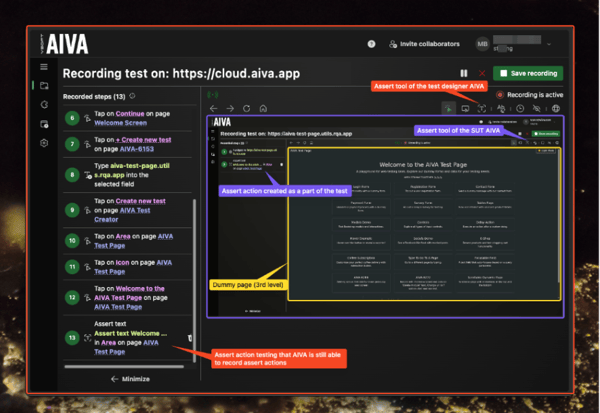
Now we cancel the recording in the SUT AIVA and save the recording in the test designer AIVA. Processing the recorded scenario takes about a minute.
When the test is completed, don’t worry about having to edit or fix any recorded steps. The test automation tool runs reliably and deterministically, regardless of page load delays, loaders, or dynamic content.
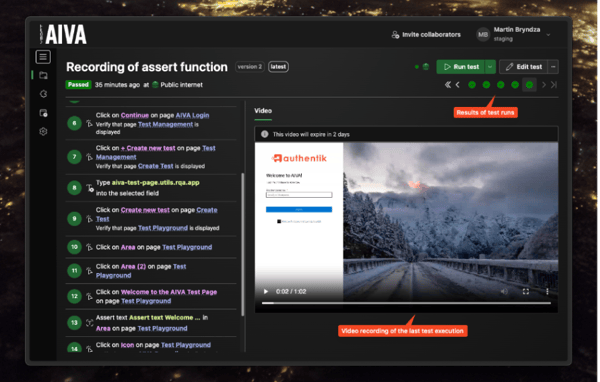
Each test execution will log into AIVA, start a new test recording, use the assert tool, and confirm the result.
Interpreting The Test Results
When a test execution fails, it’s crucial to determine which role of AIVA failed: The executor, the SUT, or both. Possible scenarios include:
- AIVA was unable to record new assert actions
- AIVA was unable to execute new assert actions
- Backwards compatibility issues with executing older assert actions
With this scenario, we’ve only covered the 1st option. Without a more detailed analysis of the results, it would be impossible to tell which part of the functionality is not working as expected. So, we need to design three tests:
- Record a new test with an assert step (the test we’ve just made)
- Record and run a new test with an assert step
- Run a pre-recorded test from an earlier version of AIVA
Provided that all other parts of the system are working (authentication, test creation, test execution, etc.), we can make a conclusion about the assert functionality purely based on the results of the three tests.
|
1st test |
2nd test |
3rd test |
Conclusion |
|
PASS |
PASS |
FAIL |
A backward compatibility issue |
|
PASS |
FAIL |
PASS |
The newly recorded assertions are faulty |
|
PASS |
FAIL |
FAIL |
An issue with the execution of the assert function |
|
FAIL |
PASS |
PASS |
Impossible – the 1st test is embedded in the 2nd test |
|
FAIL |
PASS |
FAIL |
Impossible |
|
FAIL |
FAIL |
PASS |
Issue using asserts in test creation |
|
FAIL |
FAIL |
FAIL |
An integral issue with the assert function |
Since test result analysis is a repeated effort, the extra effort spent on creating an individual test case for each part of the E2E scenario will pay off.
Why Do Automated Tests Catch Bugs Manual Tests Miss?
During manual testing, the SUT (System Under Test) occasionally exhibits unexpected behavior. To report such an issue, a tester has to determine the exact steps to reproduce it so developers can investigate and validate a fix.
Often, when the tester retraces the steps, the SUT behaves as expected again, and the test gets marked as passed, leading to the issue being dismissed too early. At first, these sporadic issues may seem minor, since few users are likely to encounter them. But if left unresolved, they accumulate and gradually erode the system’s quality.
For example, if 20 unique issues occur once every 100 runs, users will experience a problem every fifth time they use the system. At this point, the system becomes flaky—difficult to trust—and root causes remain unclear. Debugging becomes a slippery slope, as every time you try, you run into a different issue.
One of the many benefits of test automation tools is their ability to execute tests frequently at virtually no cost. With a software test automation tool like AIVA, you can accumulate a large volume of data, helping you easily spot patterns, identify recurring or rare issues, and prioritize fixes based on frequency and impact, maximizing the reliability of your software.
📖 Read on → How to Maximize Reliability in Software Testing
You can then analyze logs and monitor data to find commonalities and, ultimately, determine the underlying cause for unexpected behavior early.
For instance, the screenshot below shows results from an automated AIVA test run by AIVA itself. The results are shown in Grafana. Most test executions pass, as is often the case with manual testing, but occasional failures reveal hidden problems. Upon investigation, we uncovered a race condition: the healing of an element was sometimes affected by other tests running simultaneously.
Thanks to AIVA, we were able to catch and address this elusive issue!
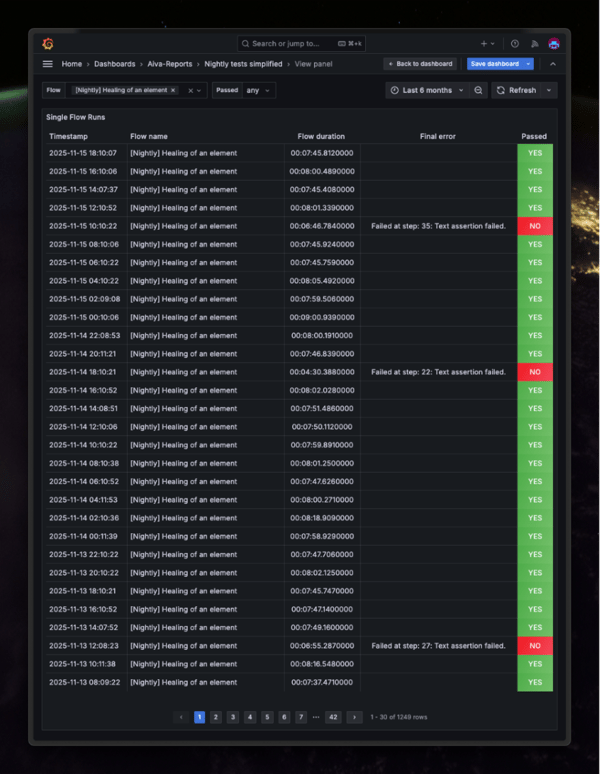
To reliably identify patterns in your test results, it’s essential to automate your tests within a system that is not prone to instability or flakiness. When failures are caused by unreliable or fragile tests, genuine issues in the SUT become obscured and much harder to diagnose.
That’s why the AIVA team prioritizes robustness and determinism, ensuring that automated tests consistently deliver trustworthy results and make true defects easier to detect.
Curious how it works? Take it for a spin and see for yourself!